1. 压缩包使用说明
-
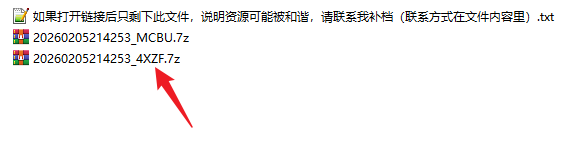
每个压缩包的密码,对应文件名末四位(非加密可忽略)
-
-
分为两种压缩包,一种解压出来直接是图,另一种解压出来是
MP4
1.1. 解压流程
点击查看解压流程
flowchart TB
    n1@{ shape: "rounded", label: "在线解压" }
    n2@{ shape: "rounded", label: "压缩包下载至本地" }
    n3@{ shape: "rounded", label: "解压失败" }
    n4@{ shape: "rounded", label: "本地解压" }
    n5@{ shape: "rounded", label: "解压成功" }
    n1 --> n3
    n1
    n5
    n3
    n2
    n2
    n2
    n6@{ shape: "rounded", label: "下载解压工具" }
    n2
    n6
    n6 --> n4
    n4 --> n5
    n2 --> n6
    n2
    n3
    n1@{ shape: "rounded", label: "在线解压" }
    n8@{ shape: "rounded", label: "离线解压" }
    n8 --> n2
    n9@{ shape: "f-circ" }
    n9
    n8
    n9 --> n1
    n3 --> n8
    n9
    n9@{ shape: "circle", label: "开始" } --> n8
    n1 --> n5
1.2. 在线解压
-
在网盘内直接解压(资源随时可能被炸链,手慢无)
-
如果解压出来是
MP4,请解压另一个压缩包或离线解压MP4
1.3. 离线解压
-
解压出来是
MP4,需要再把.mp4改为.zip使用 RAR 软件解压 -